Exclusive VPN for Android: simple privacy and protocol choice
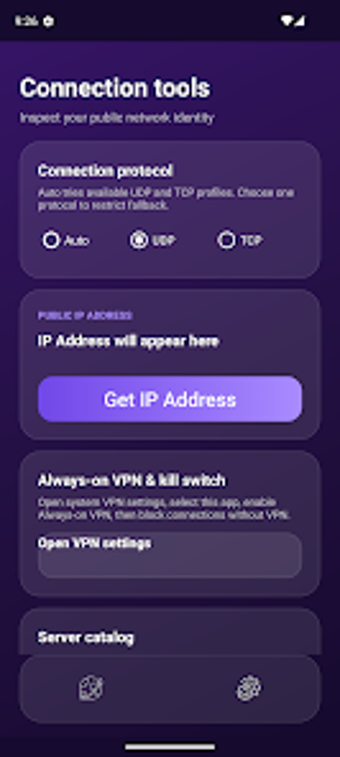
Exclusive VPN, developed by nerolet, provides encrypted browsing and IP masking for Android devices, addressing privacy and geo-access needs. The app offers multiple protocols and an automatic connection mode to choose servers and transport. A one-tap interface simplifies connecting on mobile, while UDP and TCP support gives users a choice between speed and reliability. It targets Android users who need private connections on public Wi-Fi or to bypass regional blocks.
What does Exclusive VPN do and who is it built for?
Exclusive VPN is a mobile VPN utility that encrypts traffic and masks IP addresses, aimed at Android devices, as stated by the developer nerolet. It targets people needing private connections on public networks or access to restricted content, and it operates by routing traffic through a global server network. The app's one-tap connection and Auto mode reduce manual server selection, which helps users seeking quick protection before using unsecured networks.
How does the app handle connection modes and network behaviour?
The app supports Auto, UDP, and TCP modes, so the user can balance speed and reliability: UDP for lower latency and TCP for more stable delivery. Automatic connection mode selects an optimal server and protocol, removing manual tuning for common scenarios. That design means a mobile user can switch environments without adjusting settings, but anyone needing granular control can still choose protocol explicitly to match their network conditions.
Is Exclusive VPN safe to use and what are its operational limits?
Exclusive VPN is advertised as privacy-focused and encrypts data traffic, which aligns with typical VPN behavior for masking IP addresses. The listing notes Android-only availability, so device compatibility is limited to mobile platforms. The app is free to download and may include ads or premium features, a detail that affects privacy and background behaviour for some users. People requiring confirmed privacy controls should verify in-app options before transferring sensitive data.
Practical judgement: suitable for mobile privacy needs with basic caveats
Exclusive VPN is a practical choice for Android users who need quick encrypted connections and protocol selection without complex setup. Given its one-tap interface and Auto mode, it suits mobile workflows and travel use. Verify in-app settings for advertising or premium gating before relying on it for sensitive tasks. Recommended.